Group Definitions
What is it?
Group definitions control the attributes shared by all tasks that run under a given group, including data retention period and error notification settings.
- Use this when configuring how long job data is retained for a group of tasks
- Use this when setting up error notification email recipients and message content for a group
- Groups are derived automatically from the OpCon Department Name, but can be configured to customize their behavior
Group definitions are currently defined using the OpCon MFT Agent Web Server. A connection to the OpCon MFT Agent Web Server requires a user / password for system where the OpCon MFT Agent is installed (not an OpCon user).

To define Groups, edit the associated OpCon MFT agent details using Solution Manager. Select the OpCon MFT Agent Settings TAB and then select Settings. Enter the credentials for the OpCon MFT Agent Web Server in the pop-up window and you are routed to Endpoints associated with the OpCon MFT Agent.
From the initial page, select SETTINGS and then GROUPS for defining group information.
Tasks within the OpCon MFT Agent are associated with a specific group that defines general attributes for how they run. The group name is derived from the OpCon Department Name with special characters removed. The default group defined for the OpCon MFT Agent environment is General. When a OpCon Task is submitted to the OpCon MFT Agent and the group associated with the request does not exist, the group is created.
Example

OpCon Department Name   : <General>
OpCon MFT Group name     : General

OpCon Department Name   : Test Group
OpCon MFT Group name     : TestGroup
Group definition consists of defining the retention of data for the group and a default email associated with the group (recipients, subject and address).
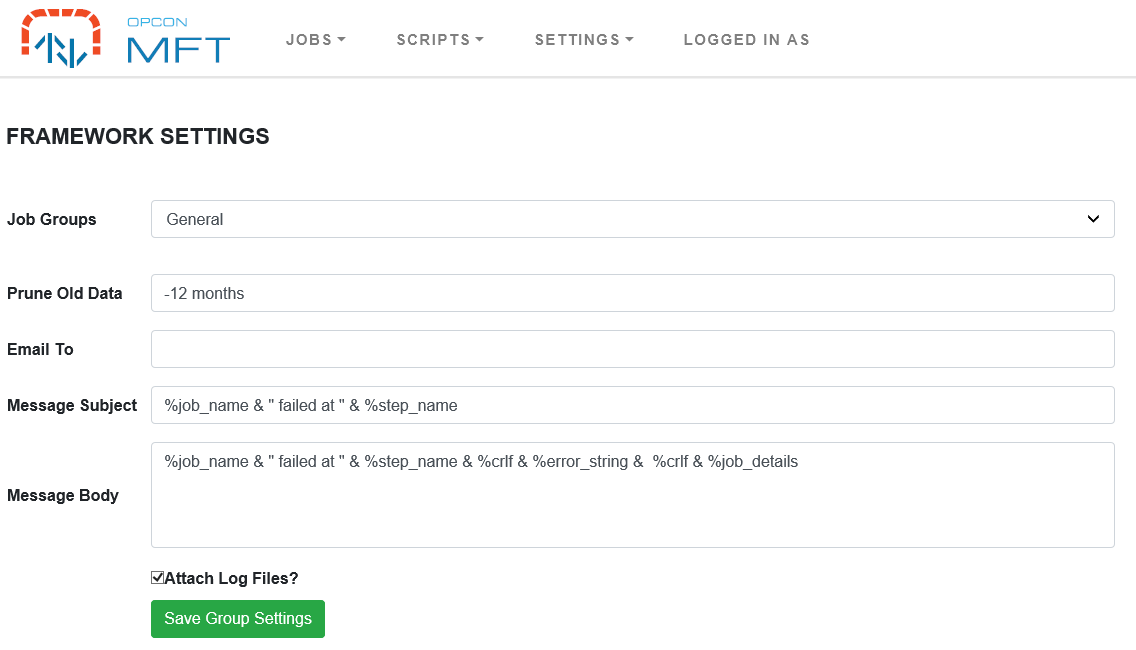
Select the required group from the list.
| Field | Description |
|---|---|
| Prune Old Data | The duration that data is stored for the group before being deleted. Enter a number followed by month, day, or hour (singular or plural), for example 12 months or 30 days. A leading + or - is ignored. Any other value is rejected and that group is not pruned. The default is 12 months. Values in hours make pruning run hourly. |
| Email To | The email address where error notifications are sent. To include multiple addresses, separate each one with a comma (,). |
| Message Subject | Subject line of error notification emails (use macros to provide default information). |
| Message Body | Email body of error notification emails (use macros to provide default information). |
| Attach Log Files | Select this option to attach the log files to the error notification. |
It is possible to perform macro substitution in the subject and message data by using the & sign to indicate string concatenation between macros and literal quoted strings.
The available macros are :
| Macro | Description |
|---|---|
| %year | The 2 digit year (i.e. 12 for 2012) |
| %month | The 2 digit month (i.e. 02 for February) |
| %month_abbreviation | The 3 character month abbreviation (i.e. Feb for February) |
| %day | The 2 digit day of the month |
| %wday | The 2-digit day of the week, Monday 01 through Sunday 07 |
| %wday_abbreviation | The 3-character day of the week (for example, Mon) |
| %hour | The 2 digit hour of the day |
| %minute | The 2 digit minute of the day |
| %second | The 2-digit second |
| %step | The last filename processed by step |
| %step[#] | The period separated token from the filename (starts with 0) IE: fileid.dat.Z.pgp, %step[0] = fileid, %step[2] = Z… |
| %job_details | The step result strings for every step processed so far |
| %job_name | The current job's name |
| %step_name | The name of the currently running step |
| %error_string | The error text of the failed step |
| %crlf | A string containing the carriage return and line feed characters |
Subject and Message Body Examples
Subject

%job_name & " failed at Step " & %step_name

Body

%job_name & " failed at Step " & %step_name & %crlf & %error_string & %crlf & %job_details
FAQs
How is a group name determined?
The group name is derived from the OpCon Department Name associated with the OpCon job. All special characters and spaces are removed. For example, a Department Name of Test Group becomes a group name of TestGroup. The default group is General.
What happens if a group does not exist when a job runs?
If the group associated with a job submission does not exist in the OpCon MFT Agent, the group is created automatically with default settings. Configure the group explicitly if custom retention or notification settings are required.
What does the Prune Old Data setting control?
The Prune Old Data field controls how long job data (including archived files and logs) is retained for the group before being automatically deleted. The value is a number followed by month, day, or hour (for example, 12 months or 30 days).
Glossary
Group — A logical container in the OpCon MFT Agent that groups tasks sharing common attributes for how they run. The group name is derived from the OpCon Department Name.
Macro — A substitution token used in email notification subject and body fields. Macros are prefixed with % and are replaced with runtime values such as the job name, step name, or current date.
Related topics: