Define the FiservCCM Connector agent
Theme: Configure
Who Is It For? System Administrator, Automation Engineer
What is it?
Before OpCon can submit jobs to the Fiserv CCM database, you must define two objects in Solution Manager: a FiservCCM script that contains the error checking information, and an agent definition that references that script.
- Use Scripts to assist with creating the error checking script.
All definitions are performed in Solution Manager.
Define the FiservCCM Connector agent
After the script is created, define the agent in Solution Manager.
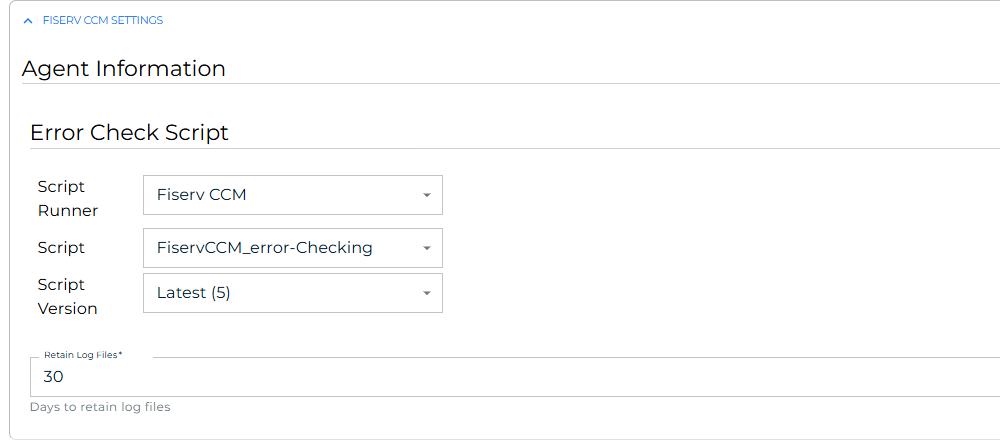
To define the agent, complete the following steps:
- In Solution Manager, select Library.
- From the Administration menu, select Agents.
- Select +Add.
- In the Name field, enter a unique name for the connection.
- In the Type field, select Fiserv CCM from the list.
- Select General Settings.
- Verify that the NetCom Name field is set to Default, or enter the name of the SMA Relay if a relay is in use.
- Select Fiserv CCM Settings.
- In the Error Check Script section, select the Script Runner, the Script that contains the
error checkinginformation, and the Script Version. - In the Retain Log Files field, enter the number of days to retain log files. The field is required and defaults to 30. Each time a job finishes, log and error checking files older than this are deleted from the
jobOutput\Fiserv CCMfolder under the plugin's directory. - Select the Save button.
- Select Communication Settings.
- Verify that the Requires XML Escape Sequences: User-Defined field is set to True. If it is not, set it to True and select the Save button.
- Select the Change Communication Status button and select Enable Full Comm. The agent connection is established.
FAQs
What does the NetCom Name field control?
The NetCom Name field determines which OpCon communication channel the agent uses. Use Default for standard on-premises deployments. If your environment routes agent communication through a named relay, enter the relay name here.
Glossary
NetCom — The OpCon network communication layer that handles message exchange between the OpCon server and agents.
Script Repository — The OpCon library where reusable scripts are stored and versioned. Scripts can be assigned roles for access control and referenced from agent and job definitions.