SAP Data Services subtype installation
What is it?
The SAP Data Services job subtype lets users define SAP Data Services jobs in Enterprise Manager from the Windows job type. After unzipping the SAP Data Services Connector package, install the subtype on each machine where Enterprise Manager is used.
Installing the subtype
To install the subtype, complete the following steps:
- In the
empluginsdirectory of the connector installation, locate the JAR file calledcom.sma.ui.core.jobdetails.sapds_1.0.0.202009230702.jar. - Copy the JAR file into the
dropinsfolder of the Enterprise Manager installation, for exampleC:\Program Files\OpConxps\EnterpriseManager x64\dropins.
These steps need to occur on every end user's machine that has access to Enterprise Manager to ensure their access to the subtype.
Confirm the subtype
To confirm that the subtype is available for the end-user, complete the following steps:
- Open Enterprise Manager.
- Create a new job with Windows for the Type.
- Confirm that SAP Data Services is in the job subtype list.
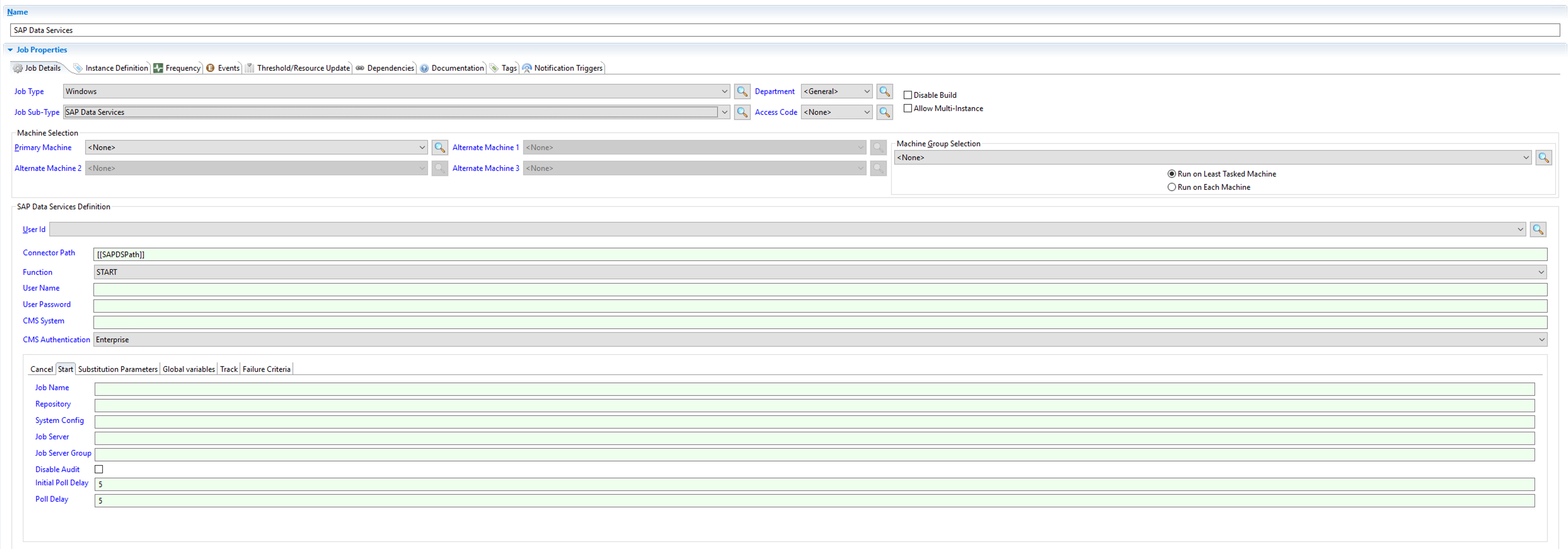
:::info note
You may have to open Enterprise Manager as an Administrator the first time in order for the subtype to show in the list. :::
FAQs
Where do I copy the subtype JAR file?
Copy com.sma.ui.core.jobdetails.sapds_1.0.0.202009230702.jar into the dropins folder of the Enterprise Manager installation on each Enterprise Manager machine.
Do I need to install the subtype on every Enterprise Manager machine? Yes. The JAR must be present on every end user's machine that uses Enterprise Manager to make the SAP Data Services subtype available.
Why doesn't the subtype show up the first time I open Enterprise Manager? You may need to open Enterprise Manager as an Administrator the first time so that the subtype is registered.
Glossary
Subtype — A specialization of an OpCon job type. The SAP Data Services subtype is a Windows job type variant that exposes SAP Data Services-specific fields.
Dropins folder — The Enterprise Manager directory where plugin JAR files are placed so they are loaded at startup.